
Why WordPress Plugins Carry Most of the Risk
WordPress core vulnerabilities can be one way into a website, and attackers do exploit them, especially on sites that fall behind on WordPress updates. Plugins, however, are a far more common entry point for attackers. According to Patchstack's State of WordPress Security in 2026 (opens in a new tab) report, only six vulnerabilities were reported in WordPress core in 2025, compared with thousands of vulnerabilities reported in plugins.
Note: In the next section, we'll explore how and why 2026 has been a busier year for core.
Part of the reason plugins are a more common entry point is due to how plugins are built. Think of a WordPress site like a shopping mall. The mall's management (WordPress core) is responsible for securing the main entrance into the building, but each store (plugin) is run by a different owner with its own locks, staff, and security habits. If one store leaves its back door unlocked, an intruder doesn't just get into that store. They can get into the whole mall.
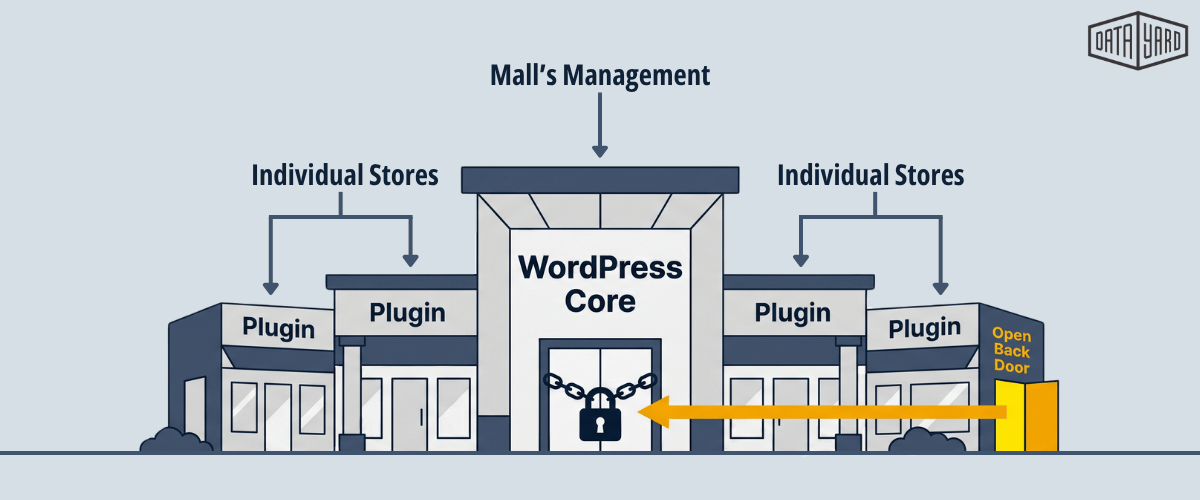
Each plugin is written and maintained by its own developer, with their own coding practices, testing process, and release schedule. Many sites run numerous plugins at once, and each one adds code that attackers can probe and potentially exploit. A single WordPress plugin vulnerability can be enough to give an attacker a way in to the entire site.
Patchstack's 2026 report (opens in a new tab) shows how that plays out across the ecosystem:
- 11,334 new vulnerabilities were found in the WordPress ecosystem in 2025, a 42% increase over 2024.
- 91% of these vulnerabilities were in plugins and 9% were in themes.
- 46% of vulnerabilities did not have a patch from the developer by the time the vulnerability was publicly disclosed.
- The weighted median time to the first reported exploit was five hours, and about half of the high-impact vulnerabilities were exploited within 24 hours.
- Only four of the ten most-attacked vulnerabilities were published in 2025. The rest were older flaws that many sites still had not patched.
The takeaway is not that WordPress core is safe and plugins are not. Both can be exploited, but plugins are the more common way in, so they need to be given at least the same level of attention as WordPress core and themes, if not more.
WordPress Core Had a Busy Few Months, Too
Plugins are not the whole story in 2026. Between mid-July and early October 2026, WordPress shipped six releases that included security fixes for WordPress core itself. The table below lists each one, based on the official WordPress.org release announcements (opens in a new tab).
| Release Date | Version | What It Fixed |
|---|---|---|
| July 17, 2026 | 7.0.2 (opens in a new tab) | One critical and one high severity issue, including a REST API flaw that could lead to remote code execution. WordPress.org pushed the fix through automatic background updates. |
| August 6, 2026 | 7.0.3 (opens in a new tab) | 12 security fixes, including a high-severity cross-site scripting flaw on the login screen that could be exploited before a user logs in. |
| August 12, 2026 | 7.0.4 (opens in a new tab) | A fix for a flaw that could let users with Author access or higher run code by uploading a malicious file, on sites that use the Imagick and Ghostscript image libraries. |
| September 17, 2026 | 7.1.1 (opens in a new tab) | 11 security fixes, including two issues (nicknamed Click2Shell and Comment2Shell) that researchers showed could be used to run malicious code on the server, alongside maintenance fixes. |
| September 22, 2026 | 7.1.2 (opens in a new tab) | A critical vulnerability that could lead to remote code execution under certain server and theme conditions, later confirmed as actively exploited. |
| October 6, 2026 | 7.1.3 (opens in a new tab) | 7 security fixes, including stored cross-site scripting and a second-order SQL injection, alongside 4 bug fixes. |
Each of these announcements came with a recommendation that site owners update WordPress immediately.
The July REST API Flaw Was Actively Exploited
The July 17 release fixed two issues, tracked in the Common Vulnerabilities and Exposures (CVE) system as CVE-2026-63030 and CVE-2026-60137. These vulnerabilities, when chained together, could allow an attacker with no account to run code on a WordPress site through the REST API. According to Rapid7 (opens in a new tab), public proof-of-concept exploits appeared, and on July 21, 2026, the Cybersecurity and Infrastructure Security Agency (CISA) added both vulnerabilities to its Known Exploited Vulnerabilities catalog (opens in a new tab), which lists flaws confirmed to be exploited in real attacks.
WordPress.org (opens in a new tab) pushed the fix through automatic background updates, but Rapid7 noted that this only reaches those sites that have automatic updates turned on. It also recommended that site owners check for signs of compromise even after updating.
The September Fix Reached Back to WordPress 4.7
The September 22, 2026, release (opens in a new tab) fixed a critical vulnerability (CVE-2026-87902, rated 9.2 out of 10) that affected every WordPress version from 4.7.0 through 7.1.1. Under certain server and theme conditions, an unauthenticated attacker could get WordPress to load a PHP file from outside the active theme and run its code. WordPress back-ported the fix to every branch still eligible for security updates, back to 4.7.
Within days, Help Net Security (opens in a new tab) reported that attack traffic targeting the flaw had grown to more than ten times what Patchstack saw the evening it was disclosed, and public scanning tools had appeared. On September 26, 2026, Security Affairs (opens in a new tab) reported that CISA had added CVE-2026-87902 to its Known Exploited Vulnerabilities catalog, confirming that attackers were actively exploiting it.
Core updates matter just as much as plugin updates. Automatic background updates handle many core security releases, but it is worth confirming that every site has actually updated, especially any site where automatic updates have been turned off.
Four Plugin Vulnerabilities From 2026 Worth Knowing
Each of the examples below highlights a different part of the problem, from same-day attacks to sites that stay unpatched for months. The table below summarizes all four.
| Plugin | Active Installs | Vulnerability | Attack Impact |
|---|---|---|---|
| Elementor Pro | More than 6 million | File upload flaw allowing remote code execution | Attacks began the same day the fix was released |
| All-in-One WP Migration and Backup | More than 5 million | SQL injection that can lead to site takeover | About two weeks after the fix, roughly 65% of sites still had not updated |
| UpdraftPlus | More than 3 million | Authentication bypass | Thousands of attacks a day were happening soon after public disclosure |
| WooCommerce Wholesale Lead Capture | About 6,000 | Unauthenticated arbitrary file upload | Attacks spiked months after a fix was available |
1. Elementor Pro: Attacks Started the Day the Fix Came Out
Elementor Pro, a page builder add-on with more than 6 million active installations, had a critical vulnerability (CVE-2026-32475) in versions 4.2.1 and earlier. The flaw involved how the plugin's forms validated uploaded files, and it allowed attackers to upload a PHP file and run commands on the server. Sites were exposed if they had a published Elementor Pro form with a file upload field.
Elementor released the fix in version 4.2.2 on August 19, 2026. According to Wordfence, as reported by BleepingComputer (opens in a new tab), exploitation attempts began that same day. Attackers uploaded a webshell (a small script that gives them remote control of the server) to the plugin's form uploads folder, and by early September, Wordfence's firewall had blocked more than 190,000 exploitation attempts.
2. All-in-One WP Migration and Backup: Most Sites Didn't Update
All-in-One WP Migration and Backup, with more than 5 million active installations, had a high-severity SQL injection vulnerability (CVE-2026-19949) in versions through 7.109. An unauthenticated attacker could plant malicious data on a site, which would stay dormant until an administrator later restored a backup with the plugin. At that point, the attack chain could lead to a full site takeover.
The developer released version 7.110 with a fix on August 20, 2026. Roughly two weeks later, BleepingComputer (opens in a new tab) reported that only about 35% of sites had been updated, leaving roughly 3.25 million sites on a vulnerable version.
3. UpdraftPlus: A Fast Fix Still Wasn't Enough
UpdraftPlus, a backup plugin with more than 3 million active installations, had an authentication bypass vulnerability (CVE-2026-10795) in versions up to and including 1.26.4. It affected sites with an active Migrator key or a connection to UpdraftCentral, and it could allow unauthenticated attackers to send forged commands to the site.
The developer fixed the issue in version 1.26.5. Even so, within days of public disclosure in June 2026, Wordfence reported blocking 8,172 attacks against the vulnerability in a single 24-hour period, according to Search Engine Journal (opens in a new tab).
Takeaway: A quick vendor response protects only the sites that actually install the update.
4. WooCommerce Wholesale Lead Capture: Old Flaws Still Get Attacked
WooCommerce Wholesale Lead Capture is a premium add-on with an estimated 6,000 active installations, so it is far smaller than the other examples. Its vulnerability (CVE-2026-27540) allowed unauthenticated attackers to upload files, including PHP webshells, in versions 2.0.3.1 and earlier.
The fix was made available in a release in February of 2026, but attacks spiked between June 4 and June 17, 2026, with additional surges on July 1 and August 30. Wordfence reported (opens in a new tab) blocking more than 100,000 exploitation attempts.
Key to remember: smaller plugins still get attention from attackers, and an old, unpatched flaw can remain a target for months.
Why "Just Update" Is Not a Full Plan
Keeping plugins updated is one of the most important habits for WordPress cybersecurity, but the examples above show three gaps that updates alone don't close:
- Attacks can start within hours of the vulnerability being discovered. With a weighted median of five hours to first exploit, a site that updates weekly, or even daily, can be exposed during the window of time between a fix being released and it being applied.
- Many flaws have no patch available at the time of disclosure. When 46% of vulnerabilities are made public before a developer fix exists, there is nothing to update to yet.
- Many sites don't update quickly. As the All-in-One WP Migration example shows, millions of sites can stay on a vulnerable version for weeks, and attackers continue to target older flaws long after a fix is released.
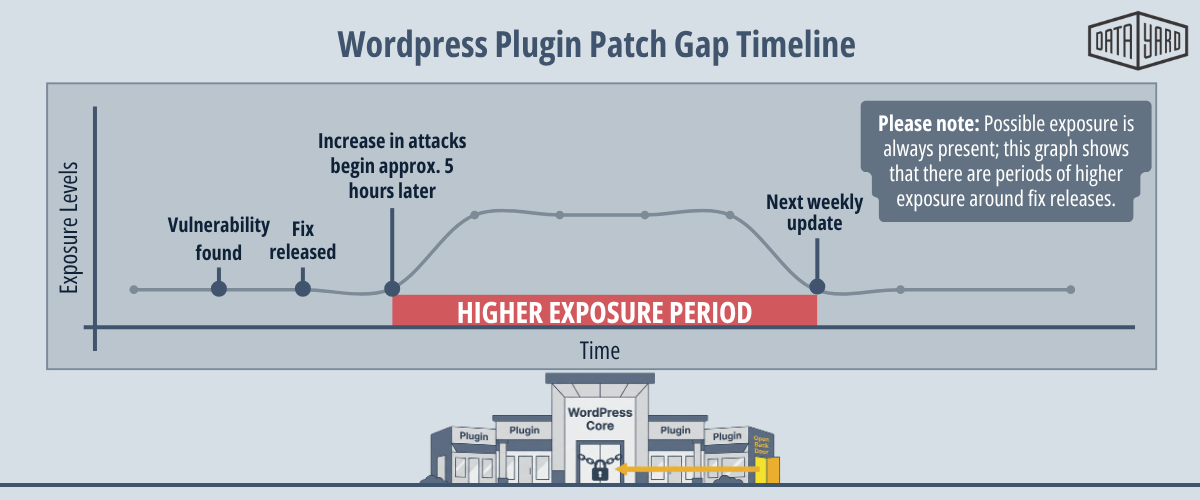
Updates can also break things. A plugin update that conflicts with a theme or another plugin can take a client's site offline, which is one reason many teams delay pushing out updates. That delay is understandable, but it is also where much of the risk sits.
Practical Steps to Reduce WordPress Plugin Risk
No single step removes plugin risk entirely. When used together, the steps below can help limit the damage a WordPress plugin vulnerability can do and close the gaps that updates alone leave open.
Step 1: Audit and Remove Plugins You Don't Need
Every plugin you remove is one less thing to patch.
Regularly review the plugins on each site and remove any that are unused, duplicated, or no longer maintained by their developer. Delete them rather than only deactivating them, because a deactivated plugin's files still sit on the server and create potential cybersecurity holes.
For agencies, keep a running inventory of which plugins (and which versions) run on which of your client sites. When a new vulnerability is announced, that list tells you right away which sites might need attention.
For many teams, a quarterly plugin review works well, along with a quick check any time a site is redesigned, handed off, or has new features added.
Step 2: Update Promptly, With a Plan
Know about critical fixes the day they come out.
Follow vulnerability sources such as Wordfence Intelligence (opens in a new tab), the Patchstack database (opens in a new tab), or WPScan (opens in a new tab) so that critical plugin fixes don't wait for the next scheduled maintenance window. Prioritize vulnerabilities that can be exploited without logging in (often labeled "unauthenticated"), since those are the easiest for attackers to automate.
As a general rhythm, check for plugin updates weekly at a minimum, and treat critical security updates as same-day work. With attacks often starting within hours of a vulnerability becoming public, waiting for a weekly or monthly maintenance window can leave a site exposed.
Apply the same urgency to WordPress core and themes. After a core security release, confirm that each site is running the new version rather than assuming that automatic updates took care of it.
Step 3: Test Updates on a Staging Site First
Test updates before they reach live client sites.
A staging environment (a private copy of the live site) lets you apply an update, confirm that the site still works as expected, and then push the change live. That makes it easier to update things quickly, because the risk of breaking the site unexpectedly becomes much less of a reason to wait.
Step 4: Use a Web Application Firewall (WAF) or Virtual Patching
Block known attacks while a fix is pending.
A web application firewall (WAF) filters malicious requests before they reach the site. Virtual patching uses firewall rules written for a specific vulnerability to block attacks against it, even before the site itself has been updated. In the Elementor Pro and WooCommerce Wholesale Lead Capture examples, firewall rules blocked hundreds of thousands of exploitation attempts.
WordPress-aware protection matters here. In two 2025 studies by Patchstack (opens in a new tab), which sells its own WordPress protection rules, general-purpose security tools blocked only 12% of attacks on known exploited WordPress vulnerabilities and 26% of attacks across a broader set of vulnerabilities. It is also worth checking how quickly your firewall receives new rules, since some vendors release them to paid plans first and to free plans weeks later.
Step 5: Keep Off-Site Backups and Test Your Restores
Have a clean copy of your site to recover from if something gets through.
If a site is compromised, restoring from a clean backup is often the fastest path to recovery. Store backups off the web server, keep several versions, and regularly test that a restore works as expected.
Two of the four examples in this post were backup and migration plugins. A backup plugin is still a plugin, so it needs the same updates and monitoring as everything else. Off-site backups managed outside of WordPress, such as DataYard's data backup and recovery services, add a separate layer of protection.
Step 6: Monitor for Signs of Compromise
Catch an attack early, before it spreads.
Several of the attacks in this post left clear signs behind. For example, Elementor Pro users were advised (opens in a new tab) to check the plugin's form uploads folder for PHP files, and Wordfence advised WooCommerce Wholesale Lead Capture users (opens in a new tab) to look for unexpected PHP files and unknown administrator accounts.
Regularly check for:
- PHP files in uploads folders, where they typically don't belong.
- Administrator accounts that no one on your team created.
- Unexpected file changes, redirects, or spikes in server resource usage.
When Managed WordPress Hosting Makes Sense
For a single site, the steps above are manageable. For an agency hosting dozens of client sites, they can quickly become a second job: tracking plugin versions across every site, reacting to vulnerability announcements, testing updates, implementing fixes, and watching for signs of compromise. Most agencies would rather spend that time on creative client work, rather than maintaining the back end of the hosting environments.
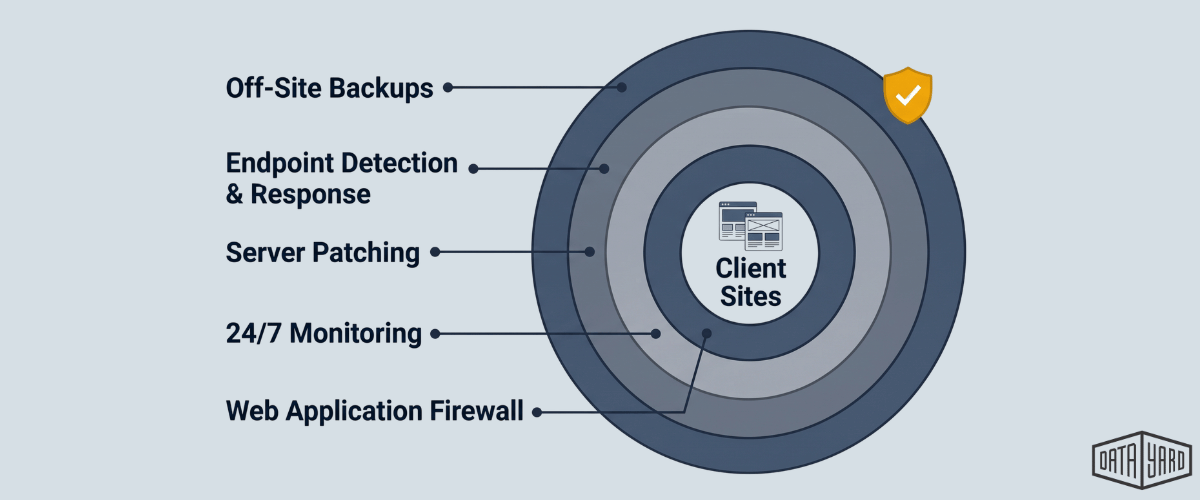
That's where managed hosting can help. It does not replace keeping plugins updated, but it can add layers of protection around every site and put a team behind the environment. DataYard's WordPress hosting for agencies runs client sites in our private cloud in Dayton, Ohio, with:
- 24/7/365 monitoring for our VIP and EDR clients, so unusual activity can get attention quickly.
- Layered cybersecurity (including next-generation security policies, web application firewall rules, and endpoint detection and response) taken into account from the start.
- Ohio-based engineers who know your environment, backed by a SOC 2 Type 2 Accredited organization.
- Data backup and recovery, including immutable offsite copies, so sites can be restored if something goes wrong.
You keep the client relationship and the creative work. We help keep the environment behind those sites secure, monitored, and online.
FAQ: WordPress Plugin Vulnerabilities
What Is a WordPress Plugin Vulnerability?
A WordPress plugin vulnerability is a security flaw in one of the add-ons that extend a WordPress site, such as page builders, forms, backup tools, and ecommerce extensions. Depending on the flaw, an attacker may be able to upload malicious files, access data, or take over the site. According to Patchstack (opens in a new tab), 91% of the vulnerabilities found in the WordPress ecosystem in 2025 were related to plugins.
Is WordPress Vulnerable to Hacking?
Like any widely used software, WordPress can have vulnerabilities. Core has a strong track record overall (Patchstack reported only six low-priority core vulnerabilities in 2025), but between July and October 2026, WordPress shipped six releases with core security fixes, including fixes for two flaws that attackers actively exploited. Most WordPress vulnerability risk still comes from plugins and themes, so keeping core, plugins, and themes updated together is one of the most important protections.
How Quickly Are WordPress Plugin Vulnerabilities Exploited?
Often within hours. Patchstack found that the weighted median time to first exploit was five hours, and about half of high-impact vulnerabilities were exploited within 24 hours. In the case of Elementor Pro in 2026, Wordfence reported that attacks began the same day the fix was released.
Should I Turn On Automatic Plugin Updates?
It depends on the site. Automatic updates can close the gap between a fix being released and being applied, which helps on lower-risk sites. For business-critical, highly customized sites, many teams prefer to test updates on a staging site first, then apply them to the production site quickly. Either way, the goal is to shorten the time that a known vulnerability stays on the live site.
What Should I Do if I Think a Plugin Was Exploited?
Update or remove the vulnerable plugin, then check for signs of compromise, such as PHP files in uploads folders and administrator accounts no one on your team created. If you confirm a compromise, restoring the site from a clean backup taken before the attack is often the safest path. If you're unsure, bring in your hosting provider or a cybersecurity team to help.
How Does Managed WordPress Hosting Help With Plugin Security?
Managed hosting does not replace keeping plugins updated, but it can add layers of protection around every site, such as firewalls, 24/7 monitoring, regular server patching, and backups, along with a team that responds when something looks wrong. For agencies managing many client sites, that can make it much easier to stay on top of plugin risk.